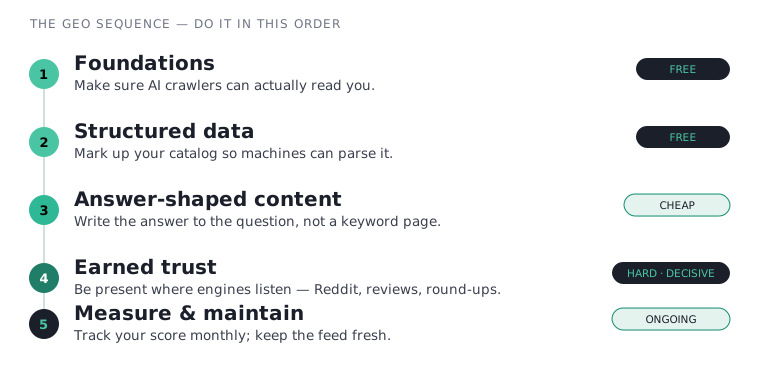
If our guide to what AI visibility is answered the why, this answers the how. GEO — generative engine optimization — is the work that gets your store named inside AI answers. Below is the actual checklist, in the order I’d run it for a small brand, using a fictional cat-supplies store, Whisker & Co., to keep every step concrete.
If you want the market data before running the checklist, start with the AI visibility statistics for ecommerce page. It separates the useful 2026 signals from the vendor hype: traffic growth, conversion, citation sources, platform share, and the brand tracking gap.
One rule before you start: do these phases in order. There’s no point writing brilliant answer-shaped content if an AI crawler can’t even reach your site, and no point buying a tracking tool to measure a store that hasn’t done the free foundational work. Resist the urge to jump to the shiny parts.
The honest framing. Roughly four-fifths of what follows is free. This guide names tools where they help, and some links may be affiliate links, but the core work here costs effort, not money — and we’ll flag every point where a paid tool is optional rather than necessary.
Phase 1: Make sure engines can read you
This is the least glamorous phase and the one that quietly sinks the most stores. If an AI crawler can’t fetch your pages, nothing else on this list matters — you’re invisible by default. And here’s the uncomfortable part: surveys in 2026 found that roughly a quarter to a third of ecommerce and SaaS sites are accidentally blocking major AI crawlers, usually at the CDN layer, often as leftover settings from the 2023 “block the scrapers” panic.
- Confirm AI crawlers aren’t blocked in
robots.txt.Each engine runs separate bots for training vs. live search. Blocking the search bot is what kills your citations. - Check your CDN / WAF isn’t overriding the file.Cloudflare’s “Block AI bots” toggle silently overrides robots.txt. This is the single most common cause of accidental invisibility.
- Make sure content renders server-side.If your product copy only appears after JavaScript runs, many crawlers see an empty page.
- Don’t
noindexpages you want cited, and keep your sitemap allowed.noindex hides a page from AI search bots too. If it should be cited, it must be indexable.
For a store that wants to be found, the right default is simple: allow the search and user-facing bots. Opting out of model training is a separate, optional IP decision that doesn’t affect whether you’re citable. Here’s a clean, visibility-first starting point:
# robots.txt — let AI answer engines read & cite you
# OpenAI (ChatGPT)
User-agent: OAI-SearchBot   # powers ChatGPT search citations
Allow: /
User-agent: ChatGPT-User    # user-triggered fetches
Allow: /
# Anthropic (Claude)
User-agent: Claude-SearchBot
Allow: /
User-agent: Claude-User
Allow: /
# Perplexity, Google, Bing, Amazon, Apple
User-agent: PerplexityBot
Allow: /
User-agent: Googlebot        # never block this one
Allow: /
User-agent: Google-Extended  # Gemini / AI Overviews
Allow: /
User-agent: Bingbot
Allow: /
User-agent: Amazonbot        # Amazon Rufus
Allow: /

# Optional — opt OUT of model *training* only (an IP choice;
# does NOT affect the search bots above):
# User-agent: GPTBot
# Disallow: /
# User-agent: ClaudeBot
# Disallow: /

Sitemap: https://yourstore.com/sitemap.xml
The Cloudflare gotcha
A correct robots.txt isn’t enough if your CDN overrides it. In Cloudflare, go to Security → Bots → AI Scrapers and Crawlers and set it to Allow, and disable Cloudflare’s “Manage robots.txt” so your own file wins. Then verify with a tool that tests many crawlers at once (Knowatoa’s AI Search Console and Merkle’s robots.txt tester are free), and re-check after every CMS upgrade — a one-line typo here can de-index a whole site overnight.
Whisker & Co. ran this check and discovered its Cloudflare bot rules were quietly turning away two retrieval crawlers. A ten-minute fix unlocked everything downstream — the highest-leverage thing it did all month.
Unblock AI crawlers on Shopify
Good news: Shopify’s default robots.txt already allows AI search bots. Stores usually go invisible for one of three reasons — check each in order.
- Look for a legacy block. Go to Online Store → Themes → your live theme → Edit code → Templates. If a
robots.txt.liquidfile exists and someone pasted a 2023-era “block AI” snippet, delete those lines. - Audit your apps. Some SEO and anti-scraper apps inject wildcard
Disallowrules that catch AI bots. Review anything that touches SEO or security. - Check Cloudflare if you front your domain with it — its “Block AI bots” / Bot Fight Mode overrides Shopify.
- Add explicit allows if needed. Create
templates/robots.txt.liquid, keep Shopify’s default loop, and append the search bots.
{%- for group in robots.default_groups -%}
{{ group.user_agent }}
{%- for rule in group.rules -%}{{ rule }}{%- endfor -%}
{%- if group.sitemap != blank -%}{{ group.sitemap }}{%- endif -%}
{%- endfor -%}

User-agent: OAI-SearchBot
Allow: /
User-agent: ChatGPT-User
Allow: /
User-agent: Claude-SearchBot
Allow: /
User-agent: PerplexityBot
Allow: /
Save, then open yourstore.com/robots.txt to confirm.
Unblock AI crawlers on WordPress / WooCommerce
- Edit robots.txt from your SEO plugin. Use Rank Math → General Settings → Edit robots.txt, Yoast → Tools → File editor, or AIOSEO. WordPress serves a virtual robots.txt; the plugin makes it real.
- Or upload a physical file. Drop a
robots.txtinto your site root via your host’s file manager — a real file overrides the virtual one. - Check your security plugin & host WAF. Wordfence and some managed hosts challenge or block bots by user agent — allowlist the AI search bots there too.
- Check Cloudflare if you use it.
- Confirm content is server-rendered. Right-click → View page source and make sure your description and price are in the HTML, not only in the rendered page.
The shortcut → if you’d rather not hunt
Don’t want to crawl through robots.txt and CDN panels by hand? An AI-visibility tool scans your store against every major crawler in seconds and shows you exactly what’s blocked. It turns “is something wrong?” into a fix-list in one click. See how the trackers compare in our AI visibility tools ranking.
Phase 2: Make your catalog machine-readable
Engines lean heavily on structured data — schema markup — to understand exactly what you sell. Without it, a crawler is squinting at your page guessing which number is the price. With it, you’re handing the model clean, labeled facts it can quote confidently. This phase is free and high-leverage; most platforms support it with an app or a template edit.
- Add
Productschema to every product page.Name, brand, SKU/GTIN, description, image, and anOfferwith price and availability. - Add
AggregateRating+Review.Star rating, review count, and real review text — a primary trust signal for engines. - Describe attributes with
additionalProperty.Noise level, size, capacity, “suits 2 cats” — the exact fields engines quote for narrow questions. - Add
FAQPageschema to product and category pages.Answer-shaped Q&A blocks are disproportionately easy for engines to lift. - Add
Organizationschema withsameAs.Link your social and marketplace profiles so the model treats you as one entity.
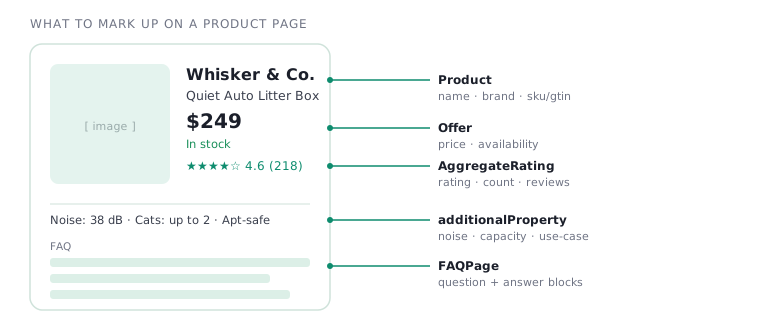
additionalProperty attributes are what win narrow, high-intent queries.Here’s the shape of the core markup — a trimmed Product + rating example to adapt. Wrap it in a <script type="application/ld+json"> tag in your page head:
{
"@context": "https://schema.org",
"@type": "Product",
"name": "Quiet Auto Litter Box",
"brand": { "@type": "Brand", "name": "Whisker & Co." },
"sku": "WC-LB-01",
"description": "Self-cleaning litter box for small apartments; quiet enough for a studio, handles up to two cats.",
"additionalProperty": [
  { "@type":"PropertyValue", "name":"Noise level", "value":"38 dB" },
  { "@type":"PropertyValue", "name":"Capacity", "value":"Up to 2 cats" }
],
"offers": { "@type":"Offer", "price":"249.00", "priceCurrency":"USD", "availability":"https://schema.org/InStock" },
"aggregateRating": { "@type":"AggregateRating", "ratingValue":"4.6", "reviewCount":"218" }
}
Validate it with Google’s Rich Results Test or Schema.org’s validator before shipping. A small note that matters for stores: research suggests a large share of ecommerce sites implement product schema incorrectly, so getting this right is itself an edge.
Get complete product schema on Shopify
Most Online Store 2.0 themes already output basic Product JSON-LD — but it’s usually missing GTIN, attributes, and review data. Fill the gaps without hand-coding.
- Add a schema app. JSON-LD for SEO, Smart SEO, Schema Plus, or Yoast SEO for Shopify can output full Product + Offer markup across your whole catalog.
- Pull review schema from your reviews app. Judge.me, Loox, Okendo, or Yotpo inject
AggregateRating/Reviewmarkup. - Add attributes via metafields. Create metafields for noise level, capacity, and use-case, then map them into
additionalProperty. - Validate & de-duplicate. If your theme and an app both emit Product schema, turn one off.
Get complete product schema on WooCommerce
WooCommerce ships basic Product schema, but it’s incomplete. The cleanest fix is one good SEO plugin — don’t run two.
- Use Rank Math (free). It includes full WooCommerce product schema, Organization, and FAQ/HowTo blocks.
- Set the type. Rank Math → Titles & Meta → Products → Schema Type = Product.
- Run one schema source only. If your theme or a second plugin also emits Product schema, switch it off.
- Enable reviews for ratings.
AggregateRatingmust come from real reviews shown on the page. - Add Organization +
sameAs. Use your SEO plugin’s knowledge graph settings. - Validate with Google’s Rich Results Test.
FAQPage markup still helps AI engines parse your Q&A cleanly.The shortcut → skip the per-product grind
Marking up products one at a time is slow. A schema app handles your whole catalog automatically, and a visibility tracker flags which products are missing data — so you fix the ones that matter first instead of auditing by hand. We break down which tools do this, and which have a free tier, in the AI visibility tools ranking.
Phase 3: Write answer-shaped content
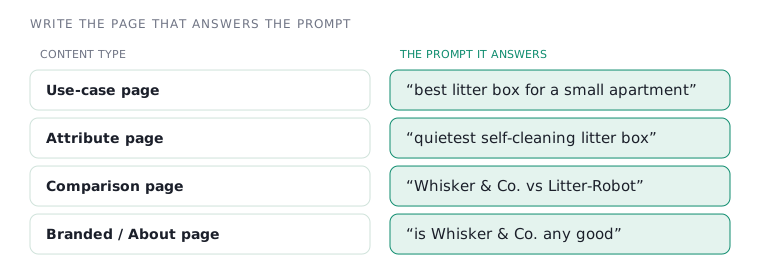
Most product and blog copy is written to rank for keywords. Engines don’t want keywords; they want the answer. The shift is simple but profound: stop writing “Automatic Litter Boxes | Whisker & Co.” and start writing the page that directly answers a real question a shopper would ask an assistant — then back it with honest detail.
- Lead with the answer.Open the page with a direct, one-paragraph answer to its core question. Don’t bury it six headings down.
- Say who it’s for and what it solves, in plain language.“Quiet enough for a studio; handles two cats” beats a spec table the model can’t map to intent.
- Cover the four content types that match how people ask.Use-case, attribute, comparison, and branded pages — mirror the way shoppers actually prompt.
- Build genuine comparison and round-up pages.Engines lean on comparative content; an honest “best X for Y” page is quotable gold.
Where this content lives on Shopify
Write comparison and round-up pieces as blog articles and use-case guides as pages. Don’t neglect collection descriptions — a collection can explain an assortment better than any single product card.
Where this content lives on WordPress
Build use-case, attribute, and comparison pieces as posts, and add Gutenberg FAQ blocks to product and category pages. Lead every page with the one-paragraph answer, then expand.
The shortcut → don’t write 50 pages from scratch
A use-case, attribute, comparison, and branded page for every product line is a lot of writing. GEO content tools draft them from your prompt list, and a tracker tells you which prompts you’re actually losing — so you write the pages that move the needle, not all of them. Build the list from the four prompt buckets above, then pick a tool from the AI visibility tools ranking.
Phase 4: Earn trust where engines listen
This is the hard, slow, decisive phase — and the one no tool can do for you. Engines trust other people’s pages about you more than your own. Analyses of large samples of AI citations keep finding third-party sources — Reddit especially — dominating what gets quoted for shopping questions. Which means the highest-value GEO work happens off your own site.
- Be genuinely useful in the communities your buyers use.Real participation in the relevant subreddits and forums — not astroturf, which engines are tuned to discount.
- Earn honest reviews on independent sites and round-ups.A spot in a credible “best litter boxes” list does more than fifty of your own blog posts.
- Get attribute-rich reviews on your own pages.Nudge customers to mention specifics — apartment size, number of cats, noise — the long-tail evidence engines quote.
- Encourage video and unboxings.YouTube is a frequently-cited source; one honest demo compounds.
- Be one consistent entity everywhere.Same name, description, and key facts across your site, socials, marketplaces, and directories.
Aim for “earned,” not just “owned”
The most defensible visibility comes from earned citations (Reddit, press, reviews) rather than owned ones (your own domain) — because a rival can rewrite their own copy overnight, but can’t fake a year of genuine community presence. If your tracking tool can split owned vs. earned, watch the earned share climb; that’s your moat forming.
Phase 5: Measure & maintain
You can’t improve what you don’t track, and you shouldn’t buy tooling before you’ve felt the manual version. Establish a baseline, watch it monthly, and aim each round of work at the queries you’re still losing.
- Build a prompt library of 20–50 real questions.Across the four content types above. Use the four prompt buckets above as a ready-made starting set.
- Run it monthly across ChatGPT, Perplexity, and Google AI Overviews.Log three things per answer: were you named, described accurately, and where versus competitors.
- Track your AI Visibility Score, sentiment, and owned-vs-earned share.Named in 6 of 30 prompts is a 20% score. Track competitors the same way.
- Keep the feed and reviews fresh.Accurate stock and prices, and a steady trickle of new reviews. Freshness is a trust signal.
- Re-aim at lost queries, and re-check phase 1 after site changes.A CMS upgrade can silently re-block crawlers — re-test periodically.
Start this by hand; it costs only attention. If you need a starter list, use our 50 AI search prompts for ecommerce brands and adapt the prompts to your category. When tracking enough prompts across enough engines genuinely hurts, that’s the signal to look at a tool — see our vendor-neutral tool comparison, where the honest first recommendation for most stores is free.
Recap: The one-page GEO checklist
Here’s the whole thing in one scannable list. Tap an item to check it off as you go.
GEO for Ecommerce — Master Checklist
- Allow AI search bots in robots.txt
- Confirm CDN/WAF isn’t overriding it
- Render product content server-side; don’t noindex pages you want cited
- Validate with a crawler tester; re-check after CMS changes
- Product schema on every product
- AggregateRating + Review markup
- additionalProperty for attributes
- FAQPage schema on product/category pages
- Organization schema with sameAs to your profiles
- Lead every key page with a direct one-paragraph answer
- State who it’s for and what it solves
- Build use-case, attribute, comparison, and branded pages
- Publish at least one honest comparison / round-up
- Participate genuinely in buyer communities
- Earn placements in independent reviews and round-ups
- Collect attribute-rich customer reviews
- Encourage video / unboxings
- Keep one consistent brand entity everywhere
- Build a 20–50 prompt monitoring library
- Run it monthly; log named / accurate / vs competitors
- Track AI Visibility Score, sentiment, owned-vs-earned
- Keep feed and reviews fresh
- Re-aim at lost queries; re-audit crawlers after site changes
Pitfalls: What not to do
Three mistakes account for most wasted GEO effort. Skipping phase 1 — doing beautiful content work while a CDN quietly blocks the crawlers — is the most common and the most painful. Astroturfing phase 4 — flooding Reddit with thinly veiled promotion — backfires, because engines and communities both discount obvious manipulation. And buying tools before doing the free work — paying for a dashboard to measure a store that hasn’t fixed its schema or crawlers — is spending money to watch a problem you haven’t started solving. Do the boring, free things first; they’re where the leverage is.
Related next steps: read the plain-English guide to what AI visibility means, build your AI search prompt library, then compare the best AI visibility tools for ecommerce only when manual tracking becomes too slow.
Methodology & transparency
This checklist synthesizes vendor documentation, schema.org guidance, and 2026 research on AI crawler behavior and citation patterns. Crawler user-agents change a few times a year, so verify current strings before editing robots.txt. Ecom AI Reviews is independent and reader-supported; some links may be affiliate links, but no vendor paid for inclusion, and the core of this guide is free work you do yourself.
Comments